
Run it,or unfold it.

Runfold turns a technical guide into a page that knows your setup: your values in every command, only the steps for your stack, and exactly as much explanation as you ask for.

  • No more pasting YOUR_SERVER_IP into a terminal.
  • No more scrolling past three distros to find yours.
  • No more choosing between a wall of text and a command nobody explains.

Open source under MIT. No account, no tracking, no server needed to read.

secure-ssh/en

One script does the whole page, with your values. Download it, read it, run it.

Serversecure-ssh.sh

03Open the new port, then move SSH

Let the firewall accept the new port before restarting SSH.

Server ·
Guided

The order matters. If SSH moves to port before the firewall lets that port in, the restart cuts the session you are typing in, and the next login times out.

Deep

ufwfirewalld accepts packets of connections that are already open before it looks at port rules, which is why this session survives. A new port does not make SSH stronger; it makes the logs readable by removing almost every automated attempt.

Keep this terminal open until a second one logs in on . It is your way back.
ssh -p @ echo okCheck

A guide, the way you would read it.

Every bad doc you have followed, fixed at the source

Runfold does not add a chatbot on top of the same old page. It changes what a page is: written once, in layers, with the reader's context declared.

The usual guide

The placeholder you forgot to replace

ssh <user>@YOUR_SERVER_IP -p PORT
# don't forget to change these!

On Runfold

Your values, already there

$ ssh ops@203.0.113.10 -p 1234

You fill a field once for the whole series. Every command on every page uses it, and a block will not copy while a value it needs is empty or invalid.
The usual guide

Three distros, one page, good luck

On Debian/Ubuntu, see 4.2.
On RHEL/Rocky, skip to 4.5,
unless you use Apache (see appendix B).

On Runfold

Only your path

Your stack: Debian · Caddy · Let's Encrypt
→ the steps for that, nothing else

Choices shape the page: the outline, the commands, the diagram and the downloadable script all follow them.

The usual guide

Too much, or not nearly enough

sudo systemctl restart ssh
# (no explanation)

…or forty paragraphs before the first command.

On Runfold

As deep as you want, per reader

Run    one script
Quick  the commands, one line each
Guided why each step, and how
Deep   the mechanism and the traps

The same page serves the person who did it last week and the person doing it for the first time.

Four depths, one page

Too lazy to read? Run the script. It worked? Read Quick to see what it did. Didn't get it? Read Guided. Want to understand everything? Read Deep.

Run

Automatique

One script that does the whole page, filled with your values.

You trust it and want it done.

Quick

Express

The commands, and one line each.

You have done this before.

Guided

Détaillé

Why each step, and how to tell it worked.

It is your first time.

Deep

Exhaustif

The mechanism, the alternatives, the traps.

You want to own it.

less to readmore to understand

Everything a good guide should have done already

  • A diagram that follows you

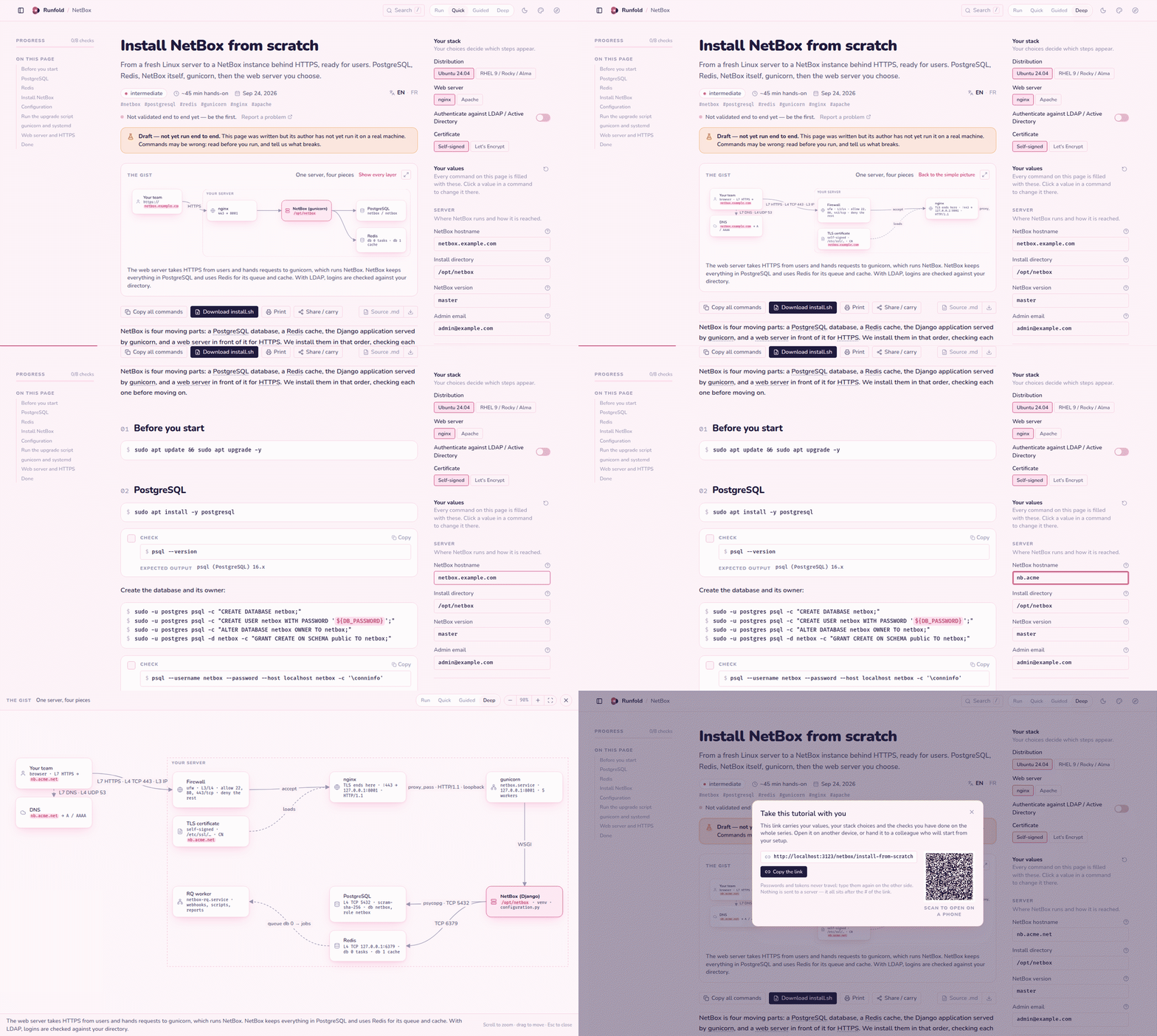
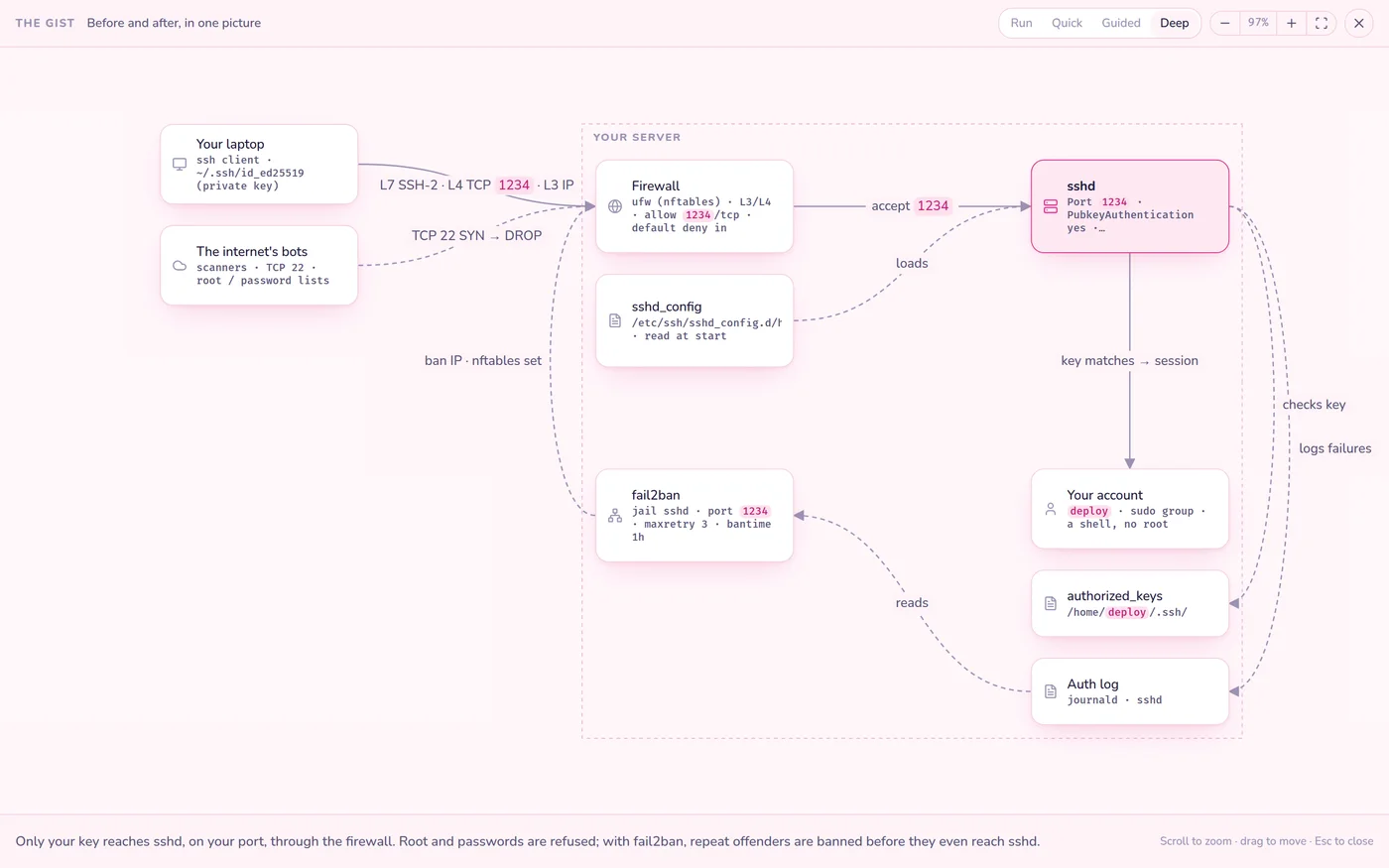
    Every page opens with the gist as a live drawing. Simple at Quick, every layer (DNS, TLS, ports, units) at Deep. Hover a box to read what it does; open it full screen.

  • Where to type it, and as whom

    Each block says whether it runs on your laptop or the server, and as which user. A file is shown once, whole, and copies as a ready command.

  • Checks you can tick

    After each step, a command and its expected output. Progress is kept per page and per series.

  • Stuck here?

    Every step has a link that opens an issue already filled with the page, the step, your level and your stack. Never your values.

  • Carry it to another machine

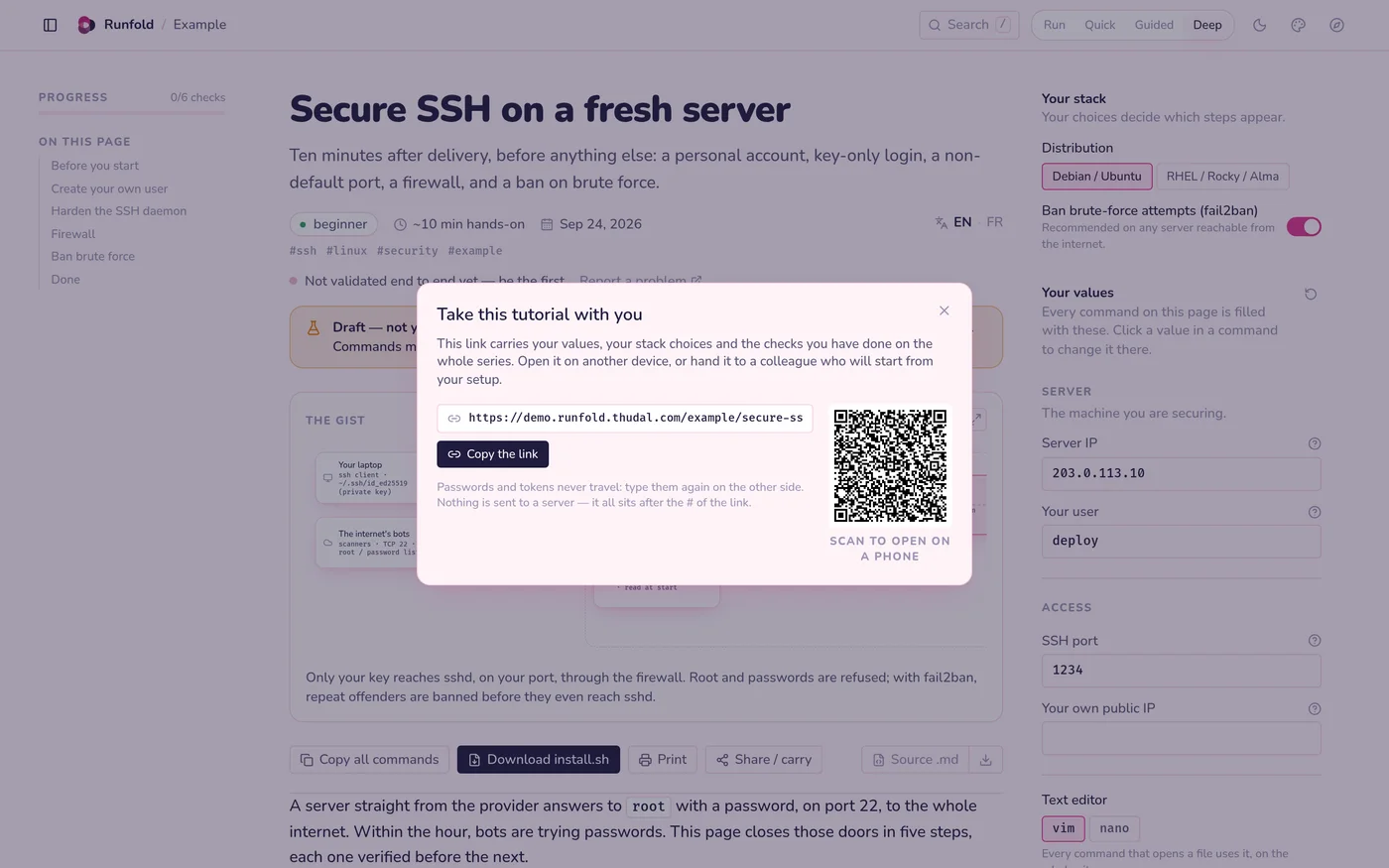
    A link and a QR code bring your values, choices and progress to your other laptop or a colleague. It lives in the URL fragment: no server sees it, and secrets never travel.

  • Search, print, fifteen skins

    Search across every page with /, print exactly what you read, and pick a look, from editorial serif to a 2001 media player.

A diagram in full screen, a box explained on hover
The gist, in full screen
The share link with its QR code
Carry your values with a link or a QR code

The real thing, in forty seconds

Switching depth, typing a hostname that rewrites every command, changing the web server, the diagram in full screen, the share link and its QR code.

A tour of the Runfold reader

Writing a page is writing Markdown

A page is a folder: the variables and choices in YAML, the prose in MDX, one file per language, and a small diagram.

  • ${SSH_PORT} in a command becomes the reader's value.
  • <Guided> and <Deep> hold the layers; <When> follows the stack.
  • The test suite compiles every page in every language and refuses an undeclared variable, a fake example or a file shown twice.
  • AUTHORING.md is a self-contained brief: give it to a person or a model with a subject, get a page back.
## Open the new port, then move SSH

```bash on="server" as="${USERNAME}"
sudo ufw allow ${SSH_PORT}/tcp
sudo systemctl restart ssh
```

<Guided>The firewall must accept <V name="SSH_PORT" />
before SSH moves to it.</Guided>

<Deep>Why the open session survives: …</Deep>

<Check cmd="ssh -p ${SSH_PORT} ${USERNAME}@${SERVER_IP} echo ok"
       expect="ok" />

Free, open, and yours to host

Runfold is a static site: build it, put it on any web server, and your team reads it without an account. It is in preview; every page in the demo is a draft until its author has run it end to end.

License
MIT. Fork it, host it, write your own guides.
Privacy
No tracking, no account. Your values stay in your browser.
Languages
English and French, per page.
Built with
Next.js, React, MDX, Tailwind CSS, Zod, Vitest.
Model
Sponsorware: new features go to sponsors first, then to everyone.